legnireb
About legnireb

legnireb's Achievements
0
Reputation
-
Unnattended Windows 7 Installation With MDT 2010
legnireb replied to legnireb's topic in Unattended Windows 7/Server 2008R2
Hi Cluberti no i downloaded as it is from the microsoft site. It makes part of a licence part agreement. Leg -
Unnattended Windows 7 Installation With MDT 2010
legnireb replied to legnireb's topic in Unattended Windows 7/Server 2008R2
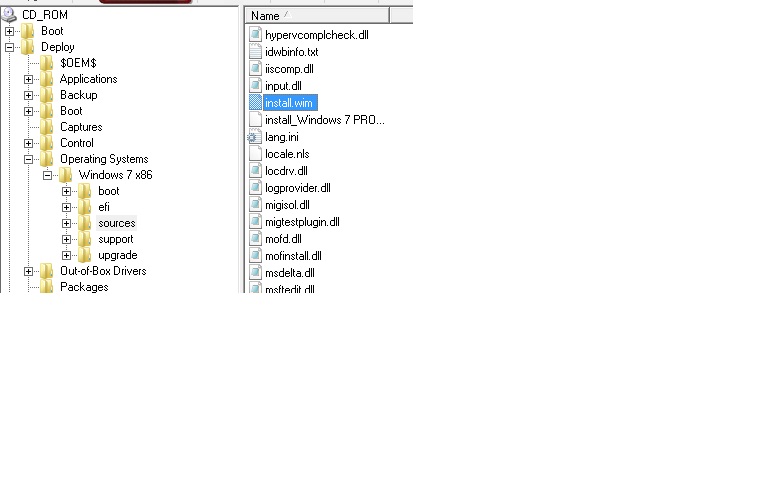
Hi Tripedacus. Ths for your reply. Answering your question: Yes, the path exists in the iso file, as you can see in the image attached. Leg
-
Hi Everyone! I have a problem i would like to bring to you. I made a Deployment Share with MDT 2010 and i did also an unatended.xml file I created a Media and the rules are configured like the rules of the deployment share and here they are: [settings] Priority=Default Properties=MyCustomProperty [Default] OSInstall=YES SkipAppsOnUpgrade=YES SkipCapture=YES SkipAdminPassword=YES SkipProductKey=YES SkipBDDWelcome=YES SkipTaskSequence=YES TaskSequenceID=WIN7X86_001 SkipDeploymentType=YES DeploymentType=NEWCOMPUTER SkipComputerName=YES OSDComputerName=teste SkipDomainMembership=YES JoinWorkgroup=WORKGROUP SkipUserData=YES UserDataLocation=NONE SkipLocaleSelection=YES UILanguage=pt-pt UserLocale=pt-pt KeyboardLocale=0816:00000816 SkipTimeZone=YES TimeZone=085 TimeZoneName=GMT Standard Time _SMSTSORGNAME=TESTE SLSHARE=%DeployRoot%\BDDLogs SkipApplications=YES SkipBitlocker=YES BdeInstallSupress=YES SkipSummary=YES FinalAction=REBOOT ------------------------------------------------------------- The bootstrap.ini : [settings] Priority=Default [Default] SkipBDDWelcome=YES ------------------------------------------------------- My unattend.xml file: <?xml version="1.0" encoding="utf-8"?> <unattend xmlns="urn:schemas-microsoft-com:unattend"> <settings pass="windowsPE"> <component name="Microsoft-Windows-Setup" processorArchitecture="x86" publicKeyToken="31bf3856ad364e35" language="neutral" versionScope="nonSxS" xmlns:wcm="http://schemas.microsoft.com/WMIConfig/2002/State">'>http://schemas.microsoft.com/WMIConfig/2002/State"> <ImageInstall> <OSImage> <WillShowUI>OnError</WillShowUI> <InstallTo> <DiskID>0</DiskID> <PartitionID>2</PartitionID> </InstallTo> <InstallFrom> <Path>.\Operating Systems\Windows 7 x86\Sources\install.wim</Path> <MetaData> <Key>/image/index</Key> <Value>4</Value> </MetaData> <Credentials> <Username /> <Password /> <Domain /> </Credentials> </InstallFrom> <InstallToAvailablePartition>false</InstallToAvailablePartition> </OSImage> </ImageInstall> <UpgradeData> <Upgrade>false</Upgrade> </UpgradeData> <Display> <ColorDepth>16</ColorDepth> <HorizontalResolution>1024</HorizontalResolution> <RefreshRate>60</RefreshRate> <VerticalResolution>768</VerticalResolution> </Display> <ComplianceCheck> <DisplayReport>OnError</DisplayReport> </ComplianceCheck> <UserData> <AcceptEula>true</AcceptEula> <ProductKey> <WillShowUI>OnError</WillShowUI> </ProductKey> </UserData> <EnableFirewall>true</EnableFirewall> <EnableNetwork>true</EnableNetwork> <Diagnostics> <OptIn>false</OptIn> </Diagnostics> <DynamicUpdate> <Enable>false</Enable> </DynamicUpdate> <PageFile> <Path /> </PageFile> </component> <component name="Microsoft-Windows-International-Core-WinPE" processorArchitecture="x86" publicKeyToken="31bf3856ad364e35" language="neutral" versionScope="nonSxS" xmlns:wcm="http://schemas.microsoft.com/WMIConfig/2002/State" xmlns:xsi="http://www.w3.org/2001/XMLSchema-instance"> <SetupUILanguage> <UILanguage>pt-PT</UILanguage> </SetupUILanguage> <InputLocale>0816:00000816</InputLocale> <SystemLocale>pt-PT</SystemLocale> <UILanguage>pt-PT</UILanguage> <UserLocale>pt-PT</UserLocale> </component> </settings> <settings pass="generalize"> <component name="Microsoft-Windows-Shell-Setup" processorArchitecture="x86" publicKeyToken="31bf3856ad364e35" language="neutral" versionScope="nonSxS" xmlns:wcm="http://schemas.microsoft.com/WMIConfig/2002/State" xmlns:xsi="http://www.w3.org/2001/XMLSchema-instance"> <DoNotCleanTaskBar>true</DoNotCleanTaskBar> <RegisteredOrganization /> <RegisteredOwner /> </component> </settings> <settings pass="specialize"> <component name="Microsoft-Windows-UnattendedJoin" processorArchitecture="x86" publicKeyToken="31bf3856ad364e35" language="neutral" versionScope="nonSxS" xmlns:wcm="http://schemas.microsoft.com/WMIConfig/2002/State">'>http://schemas.microsoft.com/WMIConfig/2002/State"> <Identification> <Credentials> <Username></Username> <Domain></Domain> <Password></Password> </Credentials> <JoinDomain></JoinDomain> <JoinWorkgroup>WORKGROUP</JoinWorkgroup> <MachineObjectOU></MachineObjectOU> </Identification> </component> <component name="Microsoft-Windows-Shell-Setup" processorArchitecture="x86" publicKeyToken="31bf3856ad364e35" language="neutral" versionScope="nonSxS" xmlns:wcm="http://schemas.microsoft.com/WMIConfig/2002/State">'>http://schemas.microsoft.com/WMIConfig/2002/State"> <ComputerName>teste</ComputerName> <ProductKey></ProductKey> <RegisteredOrganization></RegisteredOrganization> <RegisteredOwner></RegisteredOwner> <TimeZone></TimeZone> <DoNotCleanTaskBar>false</DoNotCleanTaskBar> </component> <component name="Microsoft-Windows-IE-InternetExplorer" processorArchitecture="x86" publicKeyToken="31bf3856ad364e35" language="neutral" versionScope="nonSxS" xmlns:wcm="http://schemas.microsoft.com/WMIConfig/2002/State" xmlns:xsi="http://www.w3.org/2001/XMLSchema-instance"> <Home_Page></Home_Page> <DisableFirstRunWizard>true</DisableFirstRunWizard> <DisableWelcomePage>true</DisableWelcomePage> </component> <component name="Microsoft-Windows-Deployment" processorArchitecture="x86" publicKeyToken="31bf3856ad364e35" language="neutral" versionScope="nonSxS" xmlns:wcm="http://schemas.microsoft.com/WMIConfig/2002/State" xmlns:xsi="http://www.w3.org/2001/XMLSchema-instance"> <RunSynchronous> <RunSynchronousCommand wcm:action="add"> <Description>EnableAdmin</Description> <Order>1</Order> <Path>cmd /c net user Administrator /active:yes</Path> </RunSynchronousCommand> <RunSynchronousCommand wcm:action="add"> <Description>UnfilterAdministratorToken</Description> <Order>2</Order> <Path>cmd /c reg add HKLM\SOFTWARE\Microsoft\Windows\CurrentVersion\Policies\System /v FilterAdministratorToken /t REG_DWORD /d 0 /f</Path> </RunSynchronousCommand> </RunSynchronous> </component> <component name="Microsoft-Windows-International-Core" processorArchitecture="x86" publicKeyToken="31bf3856ad364e35" language="neutral" versionScope="nonSxS" xmlns:wcm="http://schemas.microsoft.com/WMIConfig/2002/State" xmlns:xsi="http://www.w3.org/2001/XMLSchema-instance"> <InputLocale>0816:00000816</InputLocale> <SystemLocale>pt-PT</SystemLocale> <UILanguage>pt-PT</UILanguage> <UserLocale>pt-PT</UserLocale> </component> <component name="Microsoft-Windows-TapiSetup" processorArchitecture="x86" publicKeyToken="31bf3856ad364e35" language="neutral" versionScope="nonSxS" xmlns:wcm="http://schemas.microsoft.com/WMIConfig/2002/State" xmlns:xsi="http://www.w3.org/2001/XMLSchema-instance"> <TapiConfigured>0</TapiConfigured> <TapiUnattendLocation> <AreaCode>""</AreaCode> <CountryOrRegion>1</CountryOrRegion> <LongDistanceAccess>9</LongDistanceAccess> <OutsideAccess>9</OutsideAccess> <PulseOrToneDialing>1</PulseOrToneDialing> <DisableCallWaiting>""</DisableCallWaiting> <InternationalCarrierCode>""</InternationalCarrierCode> <LongDistanceCarrierCode>""</LongDistanceCarrierCode> <Name>Default</Name> </TapiUnattendLocation> </component> <component name="Microsoft-Windows-SystemRestore-Main" processorArchitecture="x86" publicKeyToken="31bf3856ad364e35" language="neutral" versionScope="nonSxS" xmlns:wcm="http://schemas.microsoft.com/WMIConfig/2002/State" xmlns:xsi="http://www.w3.org/2001/XMLSchema-instance"> <DisableSR>0</DisableSR> </component> </settings> <settings pass="oobeSystem"> <component name="Microsoft-Windows-Shell-Setup" processorArchitecture="x86" publicKeyToken="31bf3856ad364e35" language="neutral" versionScope="nonSxS" xmlns:wcm="http://schemas.microsoft.com/WMIConfig/2002/State">'>http://schemas.microsoft.com/WMIConfig/2002/State"> <UserAccounts> <AdministratorPassword> <Value>ZwBnAGkAcwBlAGMAdQByAGkAdAB5AEEAZABtAGkAbgBpAHMAdAByAGEAdABvAHIAUABhAHMAcwB3AG8AcgBkAA==</Value> <PlainText>false</PlainText> </AdministratorPassword> <LocalAccounts> <LocalAccount wcm:action="add"> <Description>Temp account</Description> <DisplayName>Temp account</DisplayName> <Group>Users</Group> <Name>TempAccount</Name> </LocalAccount> <LocalAccount wcm:action="add"> <Password> <Value>ZwBnAGkAcwBlAGMAdQByAGkAdAB5AFAAYQBzAHMAdwBvAHIAZAA=</Value> <PlainText>false</PlainText> </Password> <Description>Administration User</Description> <DisplayName>utilizador</DisplayName> <Group>Administradores</Group> <Name>utilizador</Name> </LocalAccount> </LocalAccounts> </UserAccounts> <AutoLogon> <Enabled>true</Enabled> <Username>Administrator</Username> <Domain>.</Domain> <Password> <Value>ZwBnAGkAcwBlAGMAdQByAGkAdAB5AFAAYQBzAHMAdwBvAHIAZAA=</Value> <PlainText>false</PlainText> </Password> <LogonCount>999</LogonCount> </AutoLogon> <Display> <ColorDepth>32</ColorDepth> <HorizontalResolution>1024</HorizontalResolution> <RefreshRate>60</RefreshRate> <VerticalResolution>768</VerticalResolution> </Display> <FirstLogonCommands> <SynchronousCommand wcm:action="add"> <CommandLine>cscript.exe C:\MININT\Scripts\LiteTouch.wsf /start</CommandLine> <Description>Lite Touch new OS</Description> <Order>1</Order> </SynchronousCommand> <SynchronousCommand wcm:action="add"> <CommandLine>cscript.exe D:\MININT\Scripts\LiteTouch.wsf /start</CommandLine> <Description>Lite Touch new OS</Description> <Order>2</Order> </SynchronousCommand> <SynchronousCommand wcm:action="add"> <CommandLine>cscript.exe E:\MININT\Scripts\LiteTouch.wsf /start</CommandLine> <Description>Lite Touch new OS</Description> <Order>3</Order> </SynchronousCommand> <SynchronousCommand wcm:action="add"> <CommandLine>cscript.exe F:\MININT\Scripts\LiteTouch.wsf /start</CommandLine> <Description>Lite Touch new OS</Description> <Order>4</Order> </SynchronousCommand> </FirstLogonCommands> <OOBE> <HideEULAPage>true</HideEULAPage> <NetworkLocation>Home</NetworkLocation> <ProtectYourPC>1</ProtectYourPC> <HideWirelessSetupInOOBE>true</HideWirelessSetupInOOBE> </OOBE> <RegisteredOrganization>ME</RegisteredOrganization> <RegisteredOwner>ME</RegisteredOwner> <TimeZone>GMT Standard Time</TimeZone> </component> <component name="Microsoft-Windows-International-Core" processorArchitecture="x86" publicKeyToken="31bf3856ad364e35" language="neutral" versionScope="nonSxS" xmlns:wcm="http://schemas.microsoft.com/WMIConfig/2002/State" xmlns:xsi="http://www.w3.org/2001/XMLSchema-instance"> <InputLocale>0816:00000816</InputLocale> <SystemLocale>pt-PT</SystemLocale> <UILanguage>pt-PT</UILanguage> <UserLocale>pt-PT</UserLocale> </component> </settings> <settings pass="offlineServicing"> <component name="Microsoft-Windows-PnpCustomizationsNonWinPE" processorArchitecture="x86" publicKeyToken="31bf3856ad364e35" language="neutral" versionScope="nonSxS" xmlns:wcm="http://schemas.microsoft.com/WMIConfig/2002/State" xmlns:xsi="http://www.w3.org/2001/XMLSchema-instance"> <DriverPaths> <PathAndCredentials wcm:keyValue="1" wcm:action="add"> <Path>\Drivers</Path> </PathAndCredentials> </DriverPaths> </component> </settings> <cpi:offlineImage cpi:source="catalog://PC/cw7share/operating systems/windows 7 x86/sources/install_windows 7 professional.clg" xmlns:cpi="urn:schemas-microsoft-com:cpi" /> </unattend> ------------------------------------------------------------------------------------------------------------------------------------------------ When i run a test using the iso file created, with virtual box i always receive this particular message: "Windows could not apply the Windows PE bootstrap setting specified in the unattend answer file." (This is a traduction from portuguese) and the windows error shows: ---------------------------------------------- "Setup failed applying image D:\deploy\operating Systems\Windows 7 x86\Sources\install.wim, rc=31 ZTI ERROR -Non-zero return code by LTIApply,rc=31 Litetouch deployment failed, Returned Code = -2147467259 0x80004005 Messages from the task sequence engine: Failed to save environment to (80070057) Failed to run the action:InstallOperating System. Unknown error (Error: 0000001F;Source: Unknown) The execution of the group (Install) has failed and the execution has been aborted. An action failed. UnKnown error(Error:80004004;Source:Unknown) Failed to run the last action:Install Operating System.Execution of task sequence failed. UnKnown error (Error:0000001F; Source:Unknown) Task sequence Engine failed! Code: enExecutionFail Task Sequence execution failed with error code 80004005 Error Task Sequence Manager failed to execute task sequence.Code 0x80004005." ---------------------------------------------------------------------------------- I apreciate the help you can give to understand what is wrong!!! Ths in advance. Leg
-
Hi MagicAndre1981! Ths for your quick reply. I made an Autoit script and i was trying to install it in win 7 , but i was having some problems with UI0Detect.exe service. Ths also for the usefull links you put in your reply, i found them very usefull. I manage to acomplish to solve the problem just with quotes, imagine.... I used - net stop "UI0Detect" and it worked just fine. Anyway, i must aprecciate your quick help as usual. Ths man
-
Hi Guys! I need your help! I want to be able to stop UI0Detect in Windows 7 ,because it always appears when i am installing a silent program. I already tried a batch file with - net stop UI0Detect, but the service remains the same- did'nt stop. Can you give me some advices, how to stop this service to acomplish the silent install without the Interactive services appear? After the installation i would start it. Thanks in advance
-
Hi Guys... Need your help! I have response file created, to install oracle client 9201 version and have a runOnceEx.cmd file with that configuration: cmdow @ /HID @Echo Off SET PP=%SystemDrive%\Install\ SET KEY=HKLM\SOFTWARE\Microsoft\Windows\CurrentVersion\RunOnceEx REG ADD %KEY% /V TITLE /D "Instalando Programas" /f REG ADD %KEY%\084 /VE /D "Instalando Oracle Client 9201" /f REG ADD %KEY%\084 /V 1 /D "%PP%\Oracle_Client\install\win32\setup.exe -silent -responseFile %PP%\Oracle_Client\install\win32\clientcustom.rsp" /f EXIT The problem is that the "setup.exe" file run´s only 1 or 2 seconds and then javaw.exe begins the instalations. When the setup.exe ends the runonceex.cmd window ends too and it means it wónt wait for the end of instalations, if i had another programa it would begin installing.... How to tel setup to wait for the end of oracle instalation? any ideias? Ths in advance! Leg
-
Hi cluberti Maybe you're right but why when i put the key(the same in Nlite) when it ask for in vmware, it continues the instalation? It didnt say its not a valid key...it continues and finishes the instalatrion...why? Ths for the help guys!!! Leg
-
Ok Jonhhc Ths anyway for your help.. I will try another away... Leg
-
Hi Johnhc Yes, if i put my Key (again) the instalation continues.It seems it is not reading winnt.sif... I already tried "full Automatic" its the same... My key is legal and also the cd.. Here is the setupp.ini PID: As you see its not a OEM licence... [Pid] ExtraData=79727269676D716B6C6F177A30CFE1 Pid=55729270 Another thing, i am making Nlite cd in a windows xp machine... Leg
-
As requested here it is the last session.ini. Leg LAST SESSION.INI
-
Hi everybody I have this problem: I use Nlite to make my xp cd with sp3 with my cd key in the section of unnatended. I made the iso and tested in vmware and at 33minutes it keeps asking for the cd product key...strange. Here is my winnt.sif: Perhaps you can find what is going wrong...i have tried many ways but it keeps asking for the product key , but as you can see it is in winnt.sif; ; Generated by nLite 1.4.9.1 [Data] Autopartition=0 MsDosInitiated=0 UnattendedInstall="Yes" [unattended] UnattendMode=DefaultHide UnattendSwitch="No" OemPreinstall="Yes" OemSkipEula="Yes" FileSystem=* WaitForReboot="No" NoWaitAfterTextMode=1 NoWaitAfterGUIMode=1 DriverSigningPolicy=Ignore NonDriverSigningPolicy=Ignore Hibernation="No" [Display] Xresolution=1024 Yresolution=768 BitsPerPel=32 Vrefresh=60 [systemRestore] [GuiUnattended] AdminPassword=* TimeZone=085 OEMSkipRegional=1 OemSkipWelcome=1 [Components] [userData] ProductKey="xxxxx-xxxxx-xxxxx-xxxxx-xxxxx" ComputerName=home FullName="teste" OrgName="teste" [RegionalSettings] LanguageGroup=1 Language= "0816" [Networking] InstallDefaultComponents="Yes" [WindowsFirewall] Profiles=WindowsFirewall.TurnOffFirewall [WindowsFirewall.TurnOffFirewall] Mode=0 [identification] JoinWorkgroup="REDE" ths for the help you can give Leg