blerk
About blerk

blerk's Achievements
0
Reputation
-
Thanks a lot, this did the trick for me! It seems it only integrates msu updates, but that is fine, I only have 4 updates that can't be integrated, msi, cab, and exe. They're all MS updates though.
-
Anyone any idea what is breaking the Media Center? When I start Media Center I get some disk activity then it stops and nothing ever loads. No errors in event log, no popups, nothing at all. Anyone has any idea what might break Media Center? I kept all dependancies vLite wants to keep for Media Center and Media Player, I've tried runnign eshell.exe from the command prompt, which also gives no errors. No services have been disabled or edited from the default. When I use this preset with Vista it works fine. Media Center must have some extra dependancies... mcrb.ini
-
@Jeronimo I've been playing around with your batchs file and preset, but I want to keep Media Centre, when I leave it in it won't start, no errors or anything. What would I need to keep to make sure Media Centre works? Thanks for the preset/batch files btw, it all works perfectly for me, apart from Media Centre, I have no clue whats causing it to stop working.
-
I noticed when using Jeronimo's preset that browsing via explorer opens a new window for every folder. Also what do I need to keep Media Centre working? I need it for my DVB-T stuff.
-
Ok, cheers for the info, will give it another go and also change the edition. Another quick question though, vLite complains about dependencies not being met and I can cancel or press ok to enable the dependency, I can safely ignore these right? Edit 1: I can report it is working now, changing both values did the trick. Thanks. Edit 2: At the end of installing I got an error about WINIPSEC.DLL not being present. I will try to add it to the keep list in vLite and see if that fixes it. Edit 3: Adding the WINIPSEC.DLL to the keep list worked and the install went fine, but after entering my user name and password I get a popup related internet explorer saying it can't find IESSETUP.DLL (with double s yes). After clicking ok the desktop loads fine, after a reboot the error doesn't come back.
-
No. I just used the preset, no editing, nothing at all. It is weird isn't it? If I try one of the other presets from this thread it works fine, and I get no popups. I hope there will be a vLite 1.3 or a 7lite soon
-
Unattended is unchecked in both vLite runs, and no serials are entered anywhere. I've only run the preset form the post, nothing else. Edit: Maybe I was unclear, the popup with the error appears on its own, I have no chance to do anything in the setup yet as the popup will come back as soon as I click ok.
-
Care to share your ini?
-
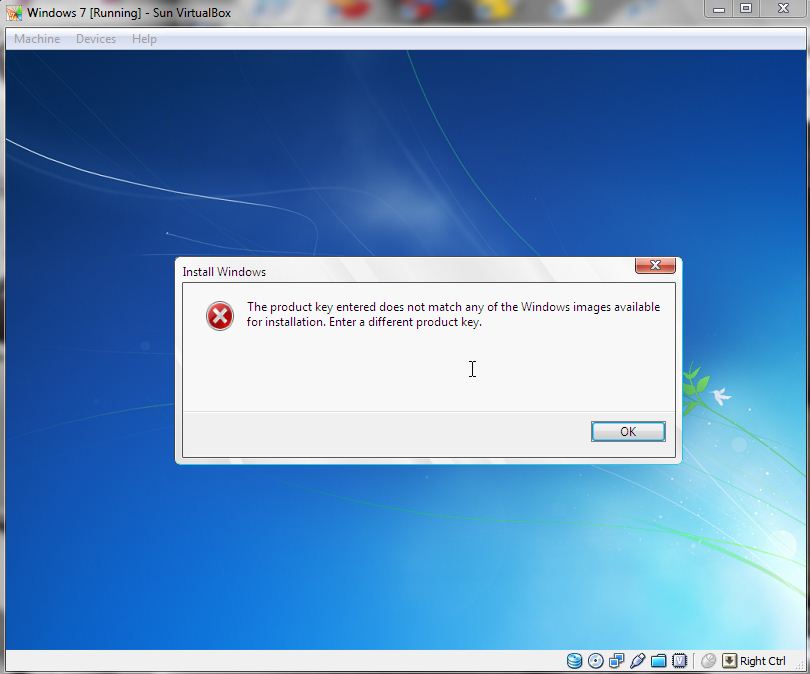
I've followed your guide and got an error about the product key. I've run all steps 3 times now, and it keeps giving the same error. Setup will loop if i pressd ok there. Maybe I do something wrong: - Run removal.bat - Run removal.bat packages in the newly opened window - Run vLite with the preset form your post - Run removal.bar cleanup (edited II to 1 because I rebuild it to 1 (Home Premium)) - Run vLite dummy, creating the ISO I don't integrate any language packs. Any ideas?