SngBrdb
About SngBrdb

- Birthday 06/19/1970
Recent Profile Visitors
2,235 profile views

SngBrdb's Achievements
0
Reputation
-
Apply categories to folders in Windows Explorer
SngBrdb replied to SngBrdb's topic in Windows Tips 'n' Tweaks
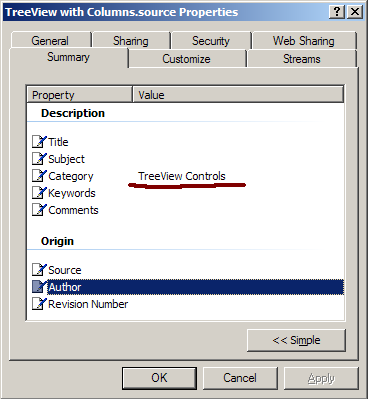
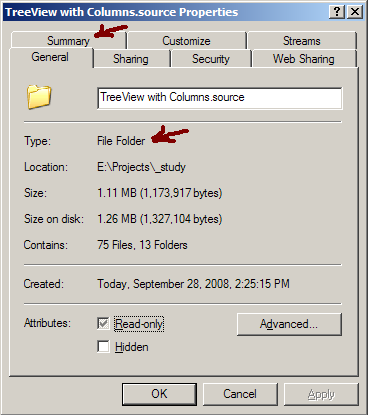
When I originally posted this, you could only link to images, not upload them - the site I had them listed on is long gone. But you're in luck, I can upload them now To group by the column in Windows 7, right-click the background in Windows Explorer and click "Group By". In the list of columns displayed, check "Category". Then right-click the background in Windows Explorer and click "Group By" to select "Category", because Microsoft After that, you can right-click the headers and uncheck "Category" from the displayed columns; the Group By Category will remain. If you get this to work in Win7 or later, let me know what you had to do! .
-
Why not invent a flying car instead of one manned, spaceship
SngBrdb replied to ROTS's topic in General Discussion
This post is a troll, right? I'm supposed to get sucked in and go off about people who sit on their a** in front of a computer and rave about what other people should do, making it sound as if they'd do it themselves if they could spare the 45 minutes it would take to strap a water balloon to a fan, right? Fortunately, I've spotted all the classic troll indicators – phrases like "any moron could"; perpetuating uninformed, snopes-quality stories that have no basis in facts; nonsensical sentence fragments; and a clear attempt to sound older than 13 – and so will not rise to the bait. On a side note, "penetration" does not have the same root as "penis". Not sure where your mind was, but the 'i' and 'e' keys aren't even side-by-side on a Dvorak keyboard. And since I'm calling you on such things: "there", "earth's", "already", "let's", and an occasional comma here and there. ¿Sí, sí?. -
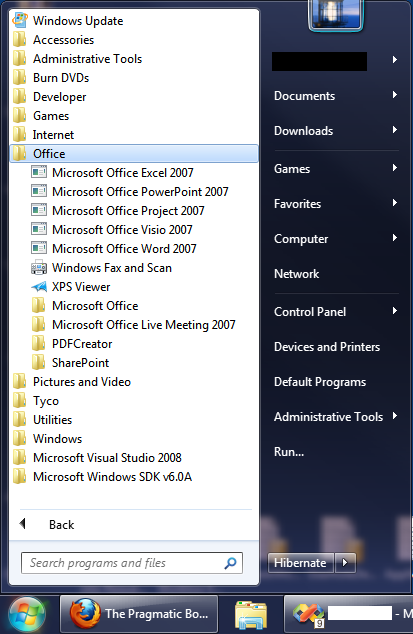
I swear I've seen information on how to disable this, but I haven't been able to find it again - here, or anywhere else. In the Windows 7 Start Menu, as folders expand, if the names of folders or shortcuts are too long, the menu text begins to automatically side-scroll or jump left and right. This is extremely annoying and makes it hard to read as you move the mouse over the menu items. How in god's name do you disable this behavior??!?
-
cluberti> Yes! I must have overlooked it... "The system is entering sleep. Sleep Reason: Battery" But the ups didn't go down on me... I wonder if the ups is dying, sending a bad signal or not enough juice. Wonder if there's a performance counter to watch the battery... I've unplugged the usb connector to the battery for now... hopefully that will keep the battery from signaling to sleep. Stoic> That's a good thought, that hadn't occurred to me. I did just recently get a new keyboard, and this has been happening both before and after the new keyboard, so I'm inclined to think it's not that. But I will keep that on the back burner to investigate if messing with the UPS doesn't do it. Thanks, all!
-
Searched the forums, didn't find a topic on this... Windows 7, x64 Intel Core 2 Duo 4 GBs RAM Plugged into UPS Windows randomly goes to sleep/hibernates (not sure which one it is) for no apparent reason. I have everything sleep/hibernate related disabled in my power config settings. I have disabled hibernation via powercfg -hibernate off. I have edited the group policy to disable hibernating on any low or critical alarm. It continues to sleep/hibernate on me. I was here today when it did it, working on my laptop... the UPS was silent, so it wasn't in response to running on battery (normally I get shrill beeps if I'm running on battery). The last two times it slept were at 4:48 PM and 4:43 PM on different days (indicated by the signoff timestamp in Pidgin), but it does not happen every day... sometimes it will go a couple of weeks without shutting down; the last two times were within three days of each other. There's nothing in my event viewer related to hibernating... all I get are a bunch of startup-related events when it's resuming. This is driving me crazy... it kills my downloads, kicks me off IM, and generally wreaks havoc on my PC. Any ideas why Windows insists on going to sleep? Or hibernate, whichever it is?? Thanks in advance! James
-
I am sooooo getting the sh*ts of this. I have everything under system restore disabled... no previous versions, no shadow copies... but Windows 7 will occasionally roll back changes to system-related directories. I've had files removed from my desktop and lost forever. I frequently have my start menu rolled back to an earlier version. This happens on both my home and work computers. Both are running Windows 7 x64. In the attached picture you will see several start menu icons for Office 2007. More than two weeks ago, I uninstalled Office 2007, and installed Office 2010. The shortcuts you see were all shortcuts to Office 2010 apps. There is absolutely no reason for this rollback. What is going on??!? I've seen very sparse discussions of this elsewhere, so it seems to be a less-common occurrence for people. Anybody who has seen this, speak up... have you found a fix/workaround for it? TIA! James
-
Right, this is different, though... Windows tracks all changes that are made to a drive in a change journal, stored in a hidden directory C:\$Extend\$UsnJrnl. Every change made to the drive is tracked, however the data itself is not stored, so it can't be used to roll back changes. I don't understand what purpose it could possibly serve (purpose that I'd care about, anyway), but it slows the system down, and if you've ever heard sudden disk thrashing for absolutely no reason, the change journal is the first suspect. you manage the change journal via the fsutil command, but every time I delete the journal, something immediately recreates it. Thanks for the input, though
-
Running Windows 7, 64-bit... Trying to delete the change journal on C with the command 'fsutil usn deletejournal /d c:' Immediately after I delete it, something restores it on c: - all other drives seem to be staying deleted. I have the Windows Search service disabled... what else could be restoring this? TIA ~ James
-
Can be done: http://maximumpcguides.com/windows-7/set-windows-search-to-search-using-file-names-and-contents-in-indexed-locations-only/ There's an option there to always search file contents (as opposed to indexed locations only). Also to include system directories and disinclude zip files Interestingly, there's no option to not search file contents...