Rhor
About Rhor

- Birthday 11/11/1979
Recent Profile Visitors
2,106 profile views


Rhor's Achievements
0
Reputation
-
Creating toolbar icons using Photoshop
Rhor replied to paulelliott's topic in Graphics and Designing Art
I use Fireworks, easier to use than Photoshop, but sufficiently powerful to meet my needs. -
Just in case you are looking for what I was looking, Trillian can be installed anywhere in the system to become a portable application.
-
Greetings. I was supposed to release this icons more than a year ago, so I guess it's better late than never. I'm still working on them so I'm releasing them in groups every 3 days or so. My DeviantART page is: http://rhor.deviantart.com I hope you like them, and I thank you in advance for any critique you may have, it's always useful.
-
vTask is compatible with 32 or 64 bit environments (or so they say), so the script should call the 64 bit version of Regedit when needed. Anyway, after many hours of trying different combinations, I was able to deduce that the only key that cannot be modified when it is being called from vTask (or AutoIt, or Autohotkey for that matter) is "HKEY_LOCAL_MACHINE\SOFTWARE\Microsoft\Windows\CurrentVersion\Run". The "Wow6432Node" variants of that same key can be modified with no problem. Finally, I remembered that Registry Workshop had command line support, so I replaced "Regedit.exe" for "RegWorkshopX64.exe" (wich installs on Program Files, not Program Files x86) on my script and it worked perfectly, I was finally able to modify "HKEY_LOCAL_MACHINE\SOFTWARE\Microsoft\Windows\CurrentVersion\Run" again. I hope someone else find this info useful in some way. AutoIt or Autohotkey suffer the same limitation of vTask in this case. Thank you.
-
I'm modifying the usual "HKEY_CURRENT_USER\Software\AnyRandomAPP" keys that stores software configurations. I have scripts written on a program called "Vtask" that install all my programs silently, and part of those scripts export configuration keys to the registry itself, the script call a .reg file to apply it. When I double click the .reg file directly, it works of course, but when the Vtask script tries to do it, it doesnt work. So I pressume is some kind of problem with Vtask itself, but I tried many things with no success, that's why I asked if I was ignoring something new with a x64 registry. I will try to use REGEDIT on "C:\Windows\SysWOW64 " in different ways to see if it works. Thank you for your comment.
-
Greetings. I have this bunch of REG files that I used to apply on Windows 7 32 bits through command line (regedit.exe /s "file.reg"). Now I had to switch to a 64 bits version of Windows 7, and when I want to apply those REG files, the registry keys do not change. Is there any special considerations I need to know to apply those REG files on 64 bits Win7 version through command line arguments? Thank you in advance.
-
Thank Mr. mritter. The "No column break" did solve the problem partially, I will try to re-arrange the categories as well. Thank you for the response.
-
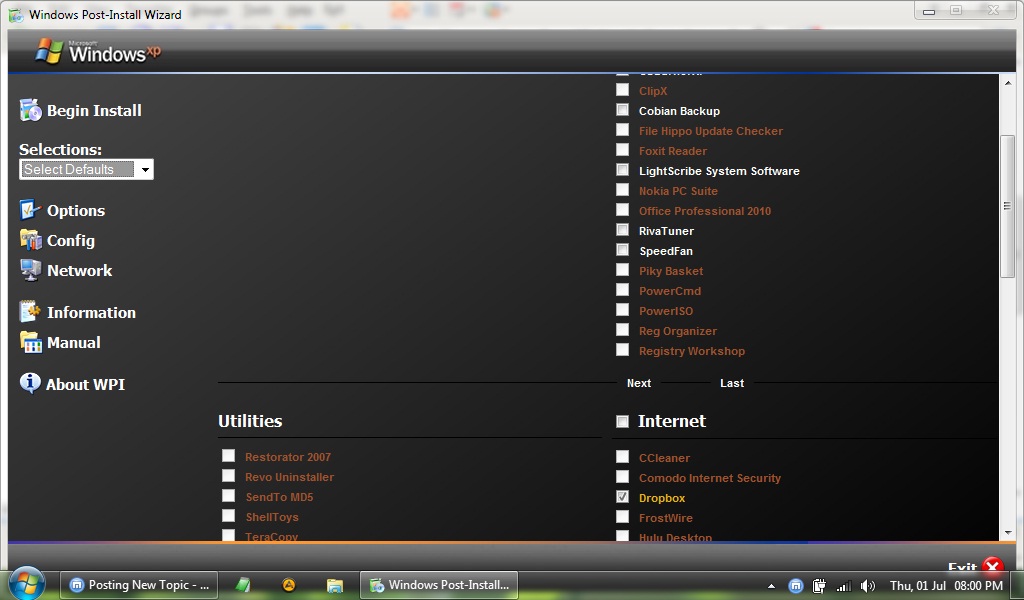
Greetings. I began using WPI again since a couple of days ago. Haven't done that in a long time. I have a list of 60 entries on 3 categories wich WPI shows only on one column in the first page. I've tried the "Number of Columns" setting changing it from 1 to 5 columns with no difference whatsoever. Is there any way I can display 2 or 3 columns on the same page? Granted, right now I'm using a netbook, with a low res of 1024x600, maybe that is the cause of my problem. The screenshot attached shows the first page with one column, and second page with two. I would like to move the first column from the second page to the first to fill up the empty spaces. Any help would be greatly appreciated. Thank you.