MSFN Forum: Replacing Parents PC - MSFN Forum

Jump to content


  • 2 Pages +
  • 1
  • 2
  • You cannot start a new topic
  • You cannot reply to this topic

Replacing Parents PC Well past needing an upgrade Rate Topic: -----

#1 User is offline   awergh 

  • MSFN Expert
  • PipPipPipPipPipPip
  • Group: Members
  • Posts: 1,054
  • Joined: 02-October 05
  • OS:none specified
  • Country: Country Flag

Posted 15 November 2009 - 06:44 PM

So since my parents PC is rather slow and I refuse to reformat to make it any faster or to free some space, the XP install is a bit over 2 years old.

Disclaimer: You might cringe at this hardware.

Mobo: Compaq board
Chipset: Intel 810
RAM: 320MB PC100
HDD: 20GB (Seagate)
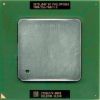
CPU: Pentium III 800Mhz
Optical drive: 52x CDRW


Anyway it way past upgrading time.

At the moment my thoughts of the hardware to buy at the computer fair are:

Gigabyte GA-G31M-ES2L or MSI G31M
E5200 or E6300
2GB Kingston DDR2 800
Seagate Barracuda 7200.12 500GB HDD
Generic Case
non-generic 350/400ish watt PSU
DVDRW


Of course I can be convinced on other things like doesn't matter if I use Seagate/WD/Samsung.
I suppose I'm willing to consider a non-generic case but I'm still trying to be cheap.
I'm not quite sure on what PSU to get because I'm not sure what PSUs are in the 350-400ish watt range perhaps Antec Earthwatts?
I am willing to consider AMD although I'm pretty unfamiliar with AMD cause the only AMD box I have is an AMDK6-2 350Mhz

I doubt anything is going to happen with this before December either.


#2 User is offline   ripken204 

  • The Hardware Guy
  • PipPipPipPipPipPipPipPipPipPip
  • Group: Members
  • Posts: 6,311
  • Joined: 23-December 04
  • OS:Windows 7 x64
  • Country: Country Flag

Posted 15 November 2009 - 07:47 PM

the earthwatts 430w is exactly what i would recommend.
the rest looks good for a nice budget build.

#3 User is offline   pointertovoid 

  • Advanced Member
  • PipPipPip
  • Group: Members
  • Posts: 333
  • Joined: 16-January 09

Posted 16 November 2009 - 03:27 PM

Your proposal looks good, especially if you put Xp on it, not Vista.

Amd has all my sympathy as an outsider but their offer is less fun right now, let's hope they improve it. You will find competitors to the Core2, maybe at a similar price, but not at the same power consumption - this translates to cooling noise and electricity bill.

With Xp, you may even consider an Atom mobo for desktop. 80-120€ mobo+processor. About 3 times as fast as you PIII 800MHz. But be very careful with the expansion capabilities!

I have the 7200.12 500GB. No worries, very silent, high throughput. Maybe Hitachi's 7k1000b has a more agile arm, but I'm not sure.

-----

The existing Pc would be very comfortable with Win Me, especially with a 7200rpm hdd.

This post has been edited by pointertovoid: 16 November 2009 - 03:28 PM


#4 User is offline   awergh 

  • MSFN Expert
  • PipPipPipPipPipPip
  • Group: Members
  • Posts: 1,054
  • Joined: 02-October 05
  • OS:none specified
  • Country: Country Flag

Posted 16 November 2009 - 06:28 PM

I doubt I'd find an atom mobo at the computer fair.
I wasn't ever considering vista, theres the potential I might change it to 7 once XP starts really dieing as it reaches end of life, but XP for now since the P3 has a retail license of XP Pro which I can use.
The P3 used to have 98SE on it and it was fine, it ran NT4 alright as well, Ill probably install 2000 on it afterward.


If the earthwatts 430w is not at the computer fair what else would you recommend, I'm pretty sure I've seen an earthwatts but I'm just making sure in case its not

#5 User is offline   Alpaca Portrait 

  • Newbie
  • Group: Members
  • Posts: 46
  • Joined: 01-December 06

Posted 17 November 2009 - 04:15 PM

What kinds of things do your parents use the PC for? Are they just browsing the web and sending e-mails? Do they even need a DVD-RW? If the motherboard can handle more RAM then upgrading from 320MB would be a huge improvement. Any why do they have 320 MB to begin with? Is it a 256 MB chip combined with a 64 MB chip?

I was in a similar situation not too long ago. All my parents use the PC for is e-mail and web browsing, but they told me it was running really slow. My dad's friends send him all kind of e-mail with large attachments and the HDD was practically full. I set him up with a Yahoo e-mail account, forwarded the stuff he wanted to keep, reformatted and reclaimed 75% of the HDD space and it's back to running at a speed that's fine for their needs.

#6 User is offline   cluberti 

  • Gustatus similis pullus
  • Group: Supervisor
  • Posts: 10,936
  • Joined: 09-September 01
  • OS:Windows 7 x64
  • Country: Country Flag

Posted 17 November 2009 - 04:48 PM

I'd be more worried about the age of the hardware in the "old" system rather than the specs, honestly. What the OP has spec'ed out will be more than adequate for his parents' needs if the old Compaq was serving their needs.

#7 User is offline   Alpaca Portrait 

  • Newbie
  • Group: Members
  • Posts: 46
  • Joined: 01-December 06

Posted 17 November 2009 - 04:51 PM

Agreed. I was just looking at things from a price perspective.

#8 User is offline   awergh 

  • MSFN Expert
  • PipPipPipPipPipPip
  • Group: Members
  • Posts: 1,054
  • Joined: 02-October 05
  • OS:none specified
  • Country: Country Flag

Posted 17 November 2009 - 05:43 PM

Quote

What kinds of things do your parents use the PC for?

IE7 (Its actually obvious that this runs slow), Outlook Express 6, Word 2000, Lotus 123, Delphi 4, Visio 2000

So they don't do anything particularly heavy.


Quote

Do they even need a DVD-RW?

A DVDRW would be to back up their data because the data uncompressed doesn't fit on a CD anymore and besides if you decide you want to upgrade to office 2007 or something its much more convenient to use the dvdrw in that pc then installing over the network.


Quote

If the motherboard can handle more RAM then upgrading from 320MB would be a huge improvement. Any why do they have 320 MB to begin with? Is it a 256 MB chip combined with a 64 MB chip?

Yeah its a 256MB and 64MB stick, as much as I could replace the 64MB stick with a 256MB stick, SDRAM isn't cheap anymore.


cluberti is right that disk is getting old and probably would be better to trust something newer

#9 User is offline   puntoMX 

  • n00b of Masters and Vice Versa
  • Group: Super Moderator
  • Posts: 4,633
  • Joined: 28-June 04
  • OS:Windows 7 x64
  • Country: Country Flag

Posted 17 November 2009 - 08:13 PM

I would change just a few things:

Motherboard: GA-G41M-ES2L, no Gbit network but it does have an updated GPU (Not that you will see much about that), the G31 is getting close to "End of Life". It also features a faster GPU core (up to 800MHz), OpenGL 2.1 and DX10 (I know, not much use with XP ;)).

CPU: E3200, 45nm also, just as good in many cases as the more expensive E5200 or E6300 (A whole 10 to 30USD... but it's something).

#10 User is offline   awergh 

  • MSFN Expert
  • PipPipPipPipPipPip
  • Group: Members
  • Posts: 1,054
  • Joined: 02-October 05
  • OS:none specified
  • Country: Country Flag

Posted 17 November 2009 - 08:53 PM

The specs say it has Gbit network, it seems pretty similar to the G31 board so its probably a good choice if I see it.
I think I prefer the E5200/E6300 over E3200 but maybe only cause E3200 is a Celeron, but i suppose Celerons aren't as bad as they used to be.
Faster GPU core is nice, I have played with GMA3100 before.

#11 User is offline   puntoMX 

  • n00b of Masters and Vice Versa
  • Group: Super Moderator
  • Posts: 4,633
  • Joined: 28-June 04
  • OS:Windows 7 x64
  • Country: Country Flag

Posted 18 November 2009 - 11:42 AM

View Postawergh, on Nov 17 2009, 08:53 PM, said:

I think I prefer the E5200/E6300 over E3200 but maybe only cause E3200 is a Celeron, but i suppose Celerons aren't as bad as they used to be.
It's just marketing mostly, in this case the core is based on the same design and on 45nm, the only big diference you will find between them is the cache; Celeron 1MB, Pentium 2GB and the FSB. Now, the realword performance between those isn't big unless you go to higher CPU speeds, let's say above 4GHz, in that case the memory and chipset will let you down.

SLGU9	2.80 GHz	E6300	2	1066 MHz	45 nm	R0	2 MB	LGA775	06
SLxxx	2.60 GHz	E5300	2	800 MHz	45 nm	R0	2 MB	LGA775	06
SLAY7	2.50 GHz	E5200	2	800 MHz	45 nm	M0	2 MB	LGA775	06
SLB9T	2.50 GHz	E5200	2	800 MHz	45 nm	R0	2 MB	LGA775	06
SLB7N	2.20 GHz	E2210	2	800 MHz	45 nm	M0	1 MB	LGA775	06
SLGU5	2.40 GHz	E3200	2	800 MHz	45 nm	R0	1 MB	LGA775	06

Note that the E2210 is also named as a Pentium while it has 1MB Cache.

#12 User is offline   CoffeeFiend 

  • Coffee Aficionado
  • Group: Super Moderator
  • Posts: 5,031
  • Joined: 14-July 04
  • OS:Windows 7 x64
  • Country: Country Flag

Posted 18 November 2009 - 04:29 PM

View PostpuntoMX, on Nov 18 2009, 12:42 PM, said:

the only big diference you will find between them is the cache

That is the most apparent one perhaps. The 100MHz clock difference shouldn't really be noticeable (4% difference). FSB wise, it makes no real difference unless its BW starved (and it's not). That leaves the cache difference, which will have a varying effect depending on what one does, but then again, if you look at passmark scores, the E3200 gets 1458 and the E5200 gets 1329 (yes, lower!) so it can't be much slower (again, depending on your workload).

The main difference for me, and what makes that I'd sooner buy a E3200 over a E5200 even if they were the same price, is that the E3200 has VT. That means you can run x64 guest OS'es under vmware/vpc/virtualbox and others, as well as use Win7's XP compatibility mode, none of which won't work with the pricier E5200.

#13 User is offline   awergh 

  • MSFN Expert
  • PipPipPipPipPipPip
  • Group: Members
  • Posts: 1,054
  • Joined: 02-October 05
  • OS:none specified
  • Country: Country Flag

Posted 18 November 2009 - 06:14 PM

oh I didn't realise that the E3200 has VT, because that was why I was thinking of E6300 because it has VT.
Afterall it is possible to goto x64 eventually although by then buying DDR2 would be way too expensive.

#14 User is offline   puntoMX 

  • n00b of Masters and Vice Versa
  • Group: Super Moderator
  • Posts: 4,633
  • Joined: 28-June 04
  • OS:Windows 7 x64
  • Country: Country Flag

Posted 18 November 2009 - 06:46 PM

SLGTL	2.6 GHz	E5300	2	800 MHz	45 nm	R0	2 MB	LGA775	06

That one also has VT, but there are 2 other E5300 models that don't have them, E5300 is about the price of the E5200 but still I would make sure you pick the right part number ;).

#15 User is offline   awergh 

  • MSFN Expert
  • PipPipPipPipPipPip
  • Group: Members
  • Posts: 1,054
  • Joined: 02-October 05
  • OS:none specified
  • Country: Country Flag

Posted 18 November 2009 - 07:13 PM

Yeah I deliberately looked for the correct E5300 at the computer fair once and I couldn't find it although I didn't actually ask them I only checked if I could see it.

#16 User is offline   CoffeeFiend 

  • Coffee Aficionado
  • Group: Super Moderator
  • Posts: 5,031
  • Joined: 14-July 04
  • OS:Windows 7 x64
  • Country: Country Flag

Posted 18 November 2009 - 08:22 PM

View Postawergh, on Nov 18 2009, 07:14 PM, said:

Afterall it is possible to goto x64 eventually although by then buying DDR2 would be way too expensive.

Then again, Intel setups with DDR3 are still relatively expensive. And 99% or so of mATX boards for C2D's only have 2 DIMM slots, so if you wanted to move beyond 2GB, you'd have to throw away your existing RAM.

For a few bucks difference with your current selection of parts, you could build a box with an Athlon II X2 240 CPU (has VT as well, same performance too), DDR3 RAM, and a LOT nicer motherboard. It would be a LOT nicer in many ways: onboard video that's a million times better in terms of performance, more video outs than just plain old VGA (often you get DVI and HDMI, sometimes DisplayPort too), 4 DIMM slots is standard on 99% of them, it would be using DDR3 that's now cheaper, and perhaps have a few more features like eSATA. I understand what rock bottom price is a big factor here, but LGA 775 is pretty much dead, DDR2 prices are on the rise (and you have no expansion capability either), and low performance GMA video with VGA-only output might not be what you're wishing for either.

Just another option worth considering :)

#17 User is offline   puntoMX 

  • n00b of Masters and Vice Versa
  • Group: Super Moderator
  • Posts: 4,633
  • Joined: 28-June 04
  • OS:Windows 7 x64
  • Country: Country Flag

Posted 18 November 2009 - 08:36 PM

Note that there are new motherboards with G41 chipsets and that do support DVI as well, and HDMI 1.1 some times and also hard to find (no idea of 1.3, have to look that up, but sound could be provided by the HD soundchip). A DDR3 mobo will cost still some 20 to 25USD more in most cases, plus the X2 240 is also a bit more expensive, if it needs to be cheap, compatible and good, the E3200 with G41 and DDr2 is still okay, just fork out directly some 3 to 4GB of DDR2 RAM that is about the same price still as DDR3 or a few bucks more.

That AMD setup is cool, and just 50 bucks more or so... but I thought it must be cheap and for 50 bucks I can buy a ATI HD4650 ;).

#18 User is offline   awergh 

  • MSFN Expert
  • PipPipPipPipPipPip
  • Group: Members
  • Posts: 1,054
  • Joined: 02-October 05
  • OS:none specified
  • Country: Country Flag

Posted 18 November 2009 - 10:23 PM

Well I was actually thinking of 1 x 2GB apposed to 2 x 1GB, for the possibility of expansion but then again if the latency changes or something you have to replace both sticks anyway.

DVI onboard could be useful eventually, because I had wondered if I should get an HD4550 or something so that it had DVI if it ever needed it.

I think I really need to find out how much I can spend, apposed to being as cheap as possible.
AMD setup sounds good, I think my main problem with it is just my unfamiliarity with AMD.

#19 User is offline   CoffeeFiend 

  • Coffee Aficionado
  • Group: Super Moderator
  • Posts: 5,031
  • Joined: 14-July 04
  • OS:Windows 7 x64
  • Country: Country Flag

Posted 18 November 2009 - 10:53 PM

View Postawergh, on Nov 18 2009, 11:23 PM, said:

AMD setup sounds good, I think my main problem with it is just my unfamiliarity with AMD.

Well, there's not a whole lot of difference (building a system-wise). It works just the same. Let's compare both options (your initial and a decent AMD setup):

GIGABYTE GA-G31M-ES2L LGA 775 Intel G31 Micro ATX Intel Motherboard - Retail
Intel Pentium E5200 Wolfdale 2.5GHz LGA 775 65W Dual-Core Processor Model BX80571E5200 - Retail
Kingston HyperX 2GB (2 x 1GB) 240-Pin DDR2 SDRAM DDR2 800 (PC2 6400) Dual Channel Kit Desktop Memory Model KHX6400D2K2/2G - Retail
Total: $178

AMD Athlon II X2 240 Regor 2.8GHz Socket AM3 65W Dual-Core Processor Model ADX240OCGQBOX - Retail
ASUS M4A785T-M/CSM AM3 AMD 785G HDMI Micro ATX AMD Motherboard - Retail
Crucial 2GB (2 x 1GB) 240-Pin DDR3 SDRAM DDR3 1333 (PC3 10600) Dual Channel Kit Desktop Memory Model CT2KIT12864BA1339 - Retail
Total: $204

So for ~$25 extra, you get:
-a motherboard that uses a socket that hasn't been replaced already (newer, faster CPUs for cheap down the road)
-far better onboard video: DirectX 10.1, it even does decoding of H.264 HD movies in 1080p in hardware (be it Blu-Ray, x264, etc), it also works great for aero glass, Photoshop CS4 OpenGL acceleration and the like
-you get DVI and HDMI outs out of the box. Going Intel with a G41 mobo negates the slight price advantage the E5200 has (while still being slower), and so does buying a $50 video card...
-you get a PCI Express 2.0 x16 slot
-4 DIMM slots instead of 2 (more expansion room)
-it uses newer and faster DDR3 (also means cheaper to upgrade down the road -- you'll easily get your $20 back then, and it'll be easier to find at that point too)
-you get more SATA connectors, a toslink out (more analog too) and more USB at the back (and more headers too)
-a newer chipset (785G is brand spanking new i.e. from 2009, whereas G31 is from 2007 and its ICH7 is from 2005)
-you can get models with eSATA and firewire too for very little more
etc.

There won't be a problem dropping a very fast quad core on this setup in a few years, along with some more DDR3 and a fast GPU should you feel like it, and without breaking the bank (AMD already has quad core CPUs for $100)

Just saying that it's worth considering, especially if you got the extra twenty bucks or so to spare. But it's not so easy undercutting the E3200 setup. Either ways, it'll run circles around the P3 (anything would)

#20 User is offline   awergh 

  • MSFN Expert
  • PipPipPipPipPipPip
  • Group: Members
  • Posts: 1,054
  • Joined: 02-October 05
  • OS:none specified
  • Country: Country Flag

Posted 19 November 2009 - 02:37 AM

Hmm doesn't sound too bad although I prefer Gigabyte/MSI to ASUS mainly because i prefer AWARD BIOS.
Although the prices would be a little more expensive but $AU isn't too bad atm.

but AMD definitely looks like a good option and I'm sure the AMD boards are there I've just always looked for intel boards

This post has been edited by awergh: 19 November 2009 - 02:38 AM


Share this topic:


  • 2 Pages +
  • 1
  • 2
  • You cannot start a new topic
  • You cannot reply to this topic

1 User(s) are reading this topic
0 members, 1 guests, 0 anonymous users


All trademarks mentioned on this page are the property of their respective owners
Copyright © 2001 - 2011 msfn.org
Privacy Policy