Yagermeister
About Yagermeister

Yagermeister's Achievements
0
Reputation
-
Vista unattended Guide
Yagermeister replied to FireGeier's topic in Unattended Windows Vista/Server 2008
Here is how i have it and this works just fine: <UserData> <ProductKey> <Key>Enter key here with the - in between</Key> <WillShowUI>OnError</WillShowUI> </ProductKey> <AcceptEula>true</AcceptEula> <FullName>Gebruiker</FullName> <Organization>Eigen</Organization> </UserData> -
Vista unattended Guide
Yagermeister replied to FireGeier's topic in Unattended Windows Vista/Server 2008
A extra letter can always happen like you said on your website aswell. I do find the solution strange aswell as you would say that it would just skip it or read back whenever its needed. It would be handy if you put it as a extra note on the website just in case someone is getting the same error. -
Vista unattended Guide
Yagermeister replied to FireGeier's topic in Unattended Windows Vista/Server 2008
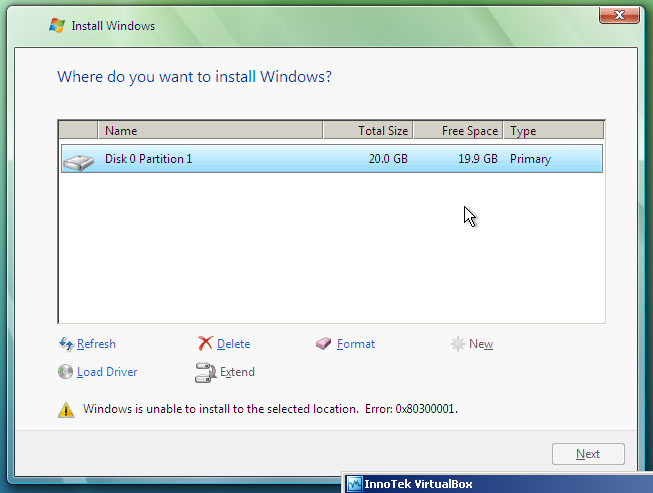
Hello Yagermeister! I can explain why you getting this box! This part here is wrong: <InstallFrom> <MetaData wcm:action="add"> <Value>Windows Vista ULTIMATE</Value> <Key>1</Key> </MetaData> </InstallFrom> This will cause an error and cause you use this setting here: <WillShowUI>OnError</WillShowUI> The whole User Interface of image selection is shown. It has to be like described in guide: <InstallFrom> <MetaData wcm:action="add"> <Value>Windows Vista ULTIMATE</Value> <Key>IMAGE/NAME/</Key> </MetaData> </InstallFrom> Than you will not be asked, which Version you like to install! So what are you doing during disk configuration? Do you create new partitions? Do you format only? Regards, Martin I think i have a idea why it fails. Maybe its because the KEY part is in front of the name itself. That is the only reason why i can imagine that it goes wrong there. The part where it goes wrong is the disk configuration itself no matter what i do or want todo. See the attached picture for the precise error. [EDIT] After changing the KEY part to what you said i still get the listbox asking which version to install :S [EDIT2] Found the error: you accidently added a / after /IMAGE/NAME/ and as far as i can tell from the created ones it isn't supposed to be there. Testing again now. [EDIT3] And yes the error was indeed the extra /. I also found out why i had the error and the solution is actually quite simple considering the WAIK messed up there. The KEY part should be added after the VALUE and not before as it was made with my WAIK. Then the disk configuration seems to work just fine.
-
Vista unattended Guide
Yagermeister replied to FireGeier's topic in Unattended Windows Vista/Server 2008
Hello Yagermeister! Well, if you use the basic Autounattend.xml you should be asked for the disk configuration. Do you get the disk configuration dialog before getting this error? And how long does it take, till you get the error? Regards, Martin With some fiddling i found out where the error is but and how to solve it using a copy of some other parts from a other auto file but then its not complete unattended anymore. I get the error while being at the disk configuration btw. I found out that the following code gives the trouble: <OSImage> <InstallFrom> <MetaData wcm:action="add"> <Key>/IMAGE/NAME</Key> <Value>Windows Vista ULTIMATE</Value> </MetaData> <Path>install.wim</Path> </InstallFrom> <InstallToAvailablePartition>false</InstallToAvailablePartition> <WillShowUI>OnError</WillShowUI> </OSImage> When i replaced it with the following it did work but i got a question which version Vista i wanted to install: <OSImage> <InstallFrom> <MetaData wcm:action="add"> <Value>Windows Vista ULTIMATE</Value> <Key>1</Key> </MetaData> </InstallFrom> <WillShowUI>OnError</WillShowUI> <InstallToAvailablePartition>false</InstallToAvailablePartition> </OSImage> Do you perhaps have a idea how i can get around the box asking which to install? -
Vista unattended Guide
Yagermeister replied to FireGeier's topic in Unattended Windows Vista/Server 2008
I seem to have a error when i try to install vista on vmware/virtualpc/virtualbox. If i use the clean dvd without the auto file i can configure my hdd just fine, but when i use the auto file (on floppy or dvd) then i get the error that i cant use the hdd. I believe the error code was 80300003. I tried searching for it but cant find anything. I also doublechecked the auto file to see if there where some wrong links but everything was just as you displayed on your website. Do you perhaps know how to fix this? -
Vista unattended Guide
Yagermeister replied to FireGeier's topic in Unattended Windows Vista/Server 2008
Thanks for the nice guide but i somehow dont have any pictures. Are they broken or am i missing something here? [EDIT] Nevermind it seems firefox blocked them