tecknomage
About tecknomage

- Birthday 12/29/1944
tecknomage's Achievements
0
Reputation
-
Thanks everyone YAP the checksum was wrong. Tried another download method and the checksum was OK, and the installer worked. Also thanks for MD5Check.
-
KB314106 fixes did not work. Note that my work system is a vanilla WinXP with SP3 installed so there's no issue with Sound Blaster cards, etc. I cannot make heads or tails of your "bad download "autofixed" by some AV utility" reference My top question is, why in the hell is nLite installer using NTDOS at all nLite is for WinXP, so why not a standard 32bit MSI or Setup.exe type installer?
-
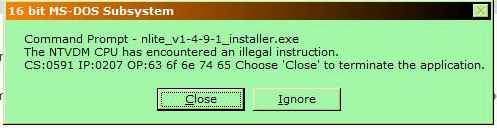
UPDATE Just tried the same nLite Installer on my WinXP SP3 system at work. Got exact same error. Also found MS KB324767 Tried fixing Config.nt & Autoexec.nt as stated (copied/pasted suggested entries), did NOT fix.
-
First, it does not matter if you launch from Command Prompt or not. I run WinXP Pro SP3.

-
Downloaded v1.4.9.1 to install, tried both archive & installer. A Command Prompt box opens and I get an error message about a NTVDM CPU illegal instruction. Looks like downloads are running a non-standard (Windows) installer. I do have .NET Framework installed (versions 2.0 SP2, 3.0 SP2, 3.5 SP1) What I'm missing to install nLite