odbod
About odbod

odbod's Achievements
0
Reputation
-
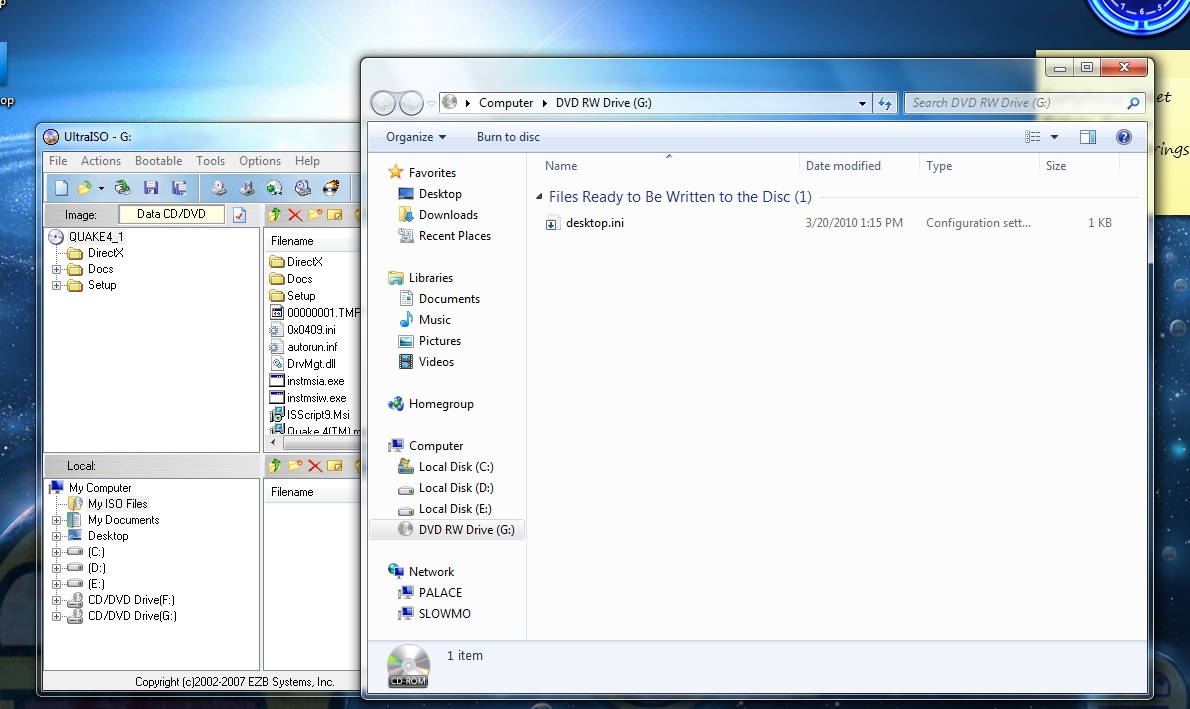
Have you tried other application for mounting your images? Like Alcohol 52%, DVDFab Virtual Drive or Gizmo Drive? I make a custom installer for UltraISO for using in unattended installations and it works great. However, I prefer Alcohol and I disable UltraISO drive. Try making more than one virtual drive to see if all fail to read your images. They all fail. However, I figured it has something to do with UDF, however, I can't really be 100% on that. I'll tell you this, I put in a Quake4 disc of mine to try to install it, Windows won't read it either, though there is plenty of activity in the drive. On this screenshot below, drive G is another DVD Drive I put into my system. I turned off all virtual drivers.

-
It falls under G because the DVD drive I have (physical) is drive F. I turn off UAC on purpose, and I've tried installing UltraISO by running as administrator, and then running UltraISO as administrator (using the right click method, of course) despite having UAC off. Still even this does not help it.
-
That's exactly what I did the second time around, I installed windows, and then installed my mounting program, UltraISO still not being able to read the virtual drive at all. SPTD is installed, as well.
-
If there is something wrong with my configuration, it wouldn't make sense that all of a sudden everything refuses to work. Even with a clean install. Device manager states the device is working properly.
-
Already tried that. Negative result.
-
----- Specs if necessary: AMD Athlon Phorus Quad-Core at 2.8 Ghz ECS GF8200A Black Edition nVidia GeForce 9500 GT PCIe 8 gb of Ram Windows 7 Ultimate x64 2x 1 TB hard drives (Seagate) ----- Just recently, I had to reinstall Windows 7 Ultimate on my system because of a HIVE issue. Everything works fine and dandy now, but now I've ran into an issue I have no way of fixing, which is why I've came here for humble advice. Regardless of the mounting ISO program I use, whether it be UltraISO, MagicISO or anything else, my mounted ISO's cannot be read. At all. I can open them and read them with the ISO programs themselves (like winrar can open them, even ultraiso can view them), extract with winrar if I need be, but I just cannot mount them without Windows telling me the following error: Windows cannot access the disc. The disc might be corrupt." This is the same error, regardless of which ISO mounting program I use (yes, even daemon tools..). I find it hard to believe that my ISO's are corrupted because they've been on the same hard drive for the past two months and I was using them before I had to reinstall windows. I can mount the very same ISO's on another PC I have, that is also using a 64 bit version of 7 Ultimate. This is what I did to try to combat this issue: -Uninstall the program(s) and then Reinstall -Reinstall Windows -Recreate the ISO's by extracting and reimaging them -Uninstall the supposed virtual device from device manager if it appeared, reinstalled it None of these options worked for me. What could be the cause of this? Why would it work at one point and then stop working all of a sudden on a clean install? Is there a fix for this or am I stuck with pseudo-corrupted iso's?
-
adding application to windows 7 install
odbod replied to srgsng25's topic in Unattended Windows 7/Server 2008R2
Maybe you can be a little bit more specific in these 'methods and ways'. For example, explain the $OEM$ method in detail perhaps. -
They didn't lie At school, windows 7 was able to extend desktops easily, and then extend the taskbar to the other side, perfectly and easily. That's assuming you use nvidia and its control panel.
-
Different Drive for Hard Drive Installation
odbod replied to odbod's topic in Unattended Windows 2000/XP/2003
That's actually a kind of a copy-paste thing. I don't use 'start' since I'm in a normal windows enviroment setting this up. So, I'm going to assume that having AutoPartition=0 is going to have me choose where I can install windows. If that's true, does the syspart switch matter at all since the setup is starting on a different partition anyway? -
start i386\winnt32.exe /noreboot /unattend:winnt.sif Alright, so I run this when I'm wanting to create the ability to install XP from the hard drive rather than my CD's. What I want to know is if there's a switch I can use that'll tell the setup that I want to choose where windows will install, because in the winnt.sif file that generates, there's a line that says: InstallDir="\WINDOWS" My dilemna is that I have a hard drive with 2 partitions. My second partition is only 5 gb's, and that's where I put all the setup stuff. But windows always tends to install on that partition, and I can't seem to choose where to install windows. Maybe I'm doing something wrong? Hopefully someone can point out what I'm doing wrong.