rageaddict
About rageaddict

rageaddict's Achievements
0
Reputation
-
is there any way i can specify cdimage to compile the iso the way i want it to. for eg, here's the problem on knoppix on my iso: my cdshell boot is located at 12000 lba, the knoppix boot loader is located at 200,000 lba while the knoppix file system is located at 80,000 lba. i assume my optical drive is having a hard time trying to reach these files. anyone have a solution to this problem? i have tried using mkisofs GUI on sorting but can't understand it. also with using mkisofs, my dvd iso won't boot. here's the cdimage syntax im using. start cdimage.exe -l"Multi-Boot DVD" -t03/22/2008,13:00:00 -h -j1 -b"F:\asas\boot\loader.bin" -o -m "F:\asas" "C:\BOOT_AIO.iso"
-
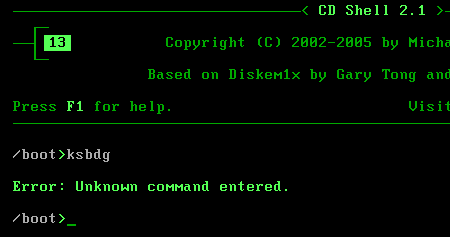
boot: show image graphics\menu.csi getkey 20 boot 0x80 if $lastKey == key[1]; then goto me if $lastKey == key[2]; then chain /2000/2000.DAT if $lastKey == key[3]; then chain /WSP2/WSP2.DAT if $lastKey == key[4]; then chain /WSP3/WSP3.DAT if $lastKey == key[5]; then chain /3STD/3STD.DAT if $lastKey == key[6]; then diskemu /KNOPPIX/boot.iso if $lastKey == key[7]; then diskemu /BT3/load.iso if $lastKey == key[8]; then isolinux /live/vmlinuz1 initrd=/live/initrd1.img boot=live union=aufs noswap vga=791 ip=frommedia nolocales if $lastKey == key[a]; then chain /XPPE/XPPE.DAT if $lastKey == key[b]; then diskemu /SETUP/UBCD/UBCD.iso if $lastKey == key[c]; then memdisk /HBCD/boot.img if $lastKey == key[d]; then diskemu /SETUP/PASS/PASS.ISO if $lastKey == key[x]; then goto serial if $lastKey == key[p]; then end if $lastKey == key[r]; then reboot if $lastKey == key[esc]; then boot 0x80 if $lastKey == key[F1]; then goto Help serial: show image graphics\serial.csi getkey goto boot me: show image graphics\me.csi getkey 20 goto boot if $lastKey == key[1]; then memdisk /SETUP/ME/COMMAND.IMA if $lastKey == key[2]; then memdisk /SETUP/ME/SETUP.IMA goto boot end the input "p" is to "quit to command prompt". but when i press "p", nothing happens... the "menu.csi" image stays at it is. the command prompt screen doesn't come up. i researched around a bit and it turns out t does actually switch to command prompt in the background when i press"p". but the image file "menu.csi" blocks it from showing. it's only when i input rubbish in front of the image screen does it switch to the command prompt. check screenshot.

-
cd won't boot? problem 1) boot sequence problem 2) bad cd (burned at high speeds) problem 3) bad/weak drive (some cd's work on it but some don't)
-
hey thanks cdob for the suggestions. but i got it figured out with cdimage and here's the code i used. it can boot both linux and windows. i'll post my work in the resources section.
-
i have windows and linux distributions on my dvd but im having trouble making an iso. im using cdimage.exe start cdimage.exe -lAIODVD -t08/23/2001,09:00:00 -b\MAIN\BOOT\loader.bin -h -n -o -m \MAIN C:\AIO-DVD.iso can someone tell me what"-h" "-n" "-o" "-m" means... ============================== better yet im trying to make a dvd with these two file systems. ISO 9660:1999 v2 (max 207) + Rock Ridge anyone kind enough to compile the necessary switches for these two file system... plz.