andrew_aj1
About andrew_aj1

andrew_aj1's Achievements
0
Reputation
-
I have been fighting with a roaming profile issue on my Server 2008 and Windows XP network. Users will sometimes get a message stating "Windows cannot find the local profile and is logging you on with a temporary profile. Changes you make to this profile will be lost when you log off" when they log into windows. Sometimes this can be resolved by rebooting the computer and then the user will log in successfully. This has affected all of the computers on the domain at least once and so far I have been unable to solve the issue. I get the following three errors in the event viewer on the XP machines when this happens: Event Type: Error Event Source: Userenv Event Category: None Event ID: 1509 Date: 12/23/2008 Time: 6:56:42 AM User: <DOMAIN>\<username> Computer: DJK4VQ41 Description: Windows cannot copy file \\s1dc01\users\profile\<username>\NTUSER.DAT to location C:\Documents and Settings\<username>\NTUSER.DAT. Possible causes of this error include network problems or insufficient security rights. If this problem persists, contact your network administrator. DETAIL - The process cannot access the file because it is being used by another process. For more information, see Help and Support Center at http://go.microsoft.com/fwlink/events.asp. Event Type: Error Event Source: Userenv Event Category: None Event ID: 1515 Date: 12/23/2008 Time: 6:56:42 AM User: <DOMAIN>\<username> Computer: DJK4VQ41 Description: Windows has backed up this user's profile. Windows will automatically try to use the backed up profile the next time this user logs on. For more information, see Help and Support Center at http://go.microsoft.com/fwlink/events.asp. Event Type: Error Event Source: Userenv Event Category: None Event ID: 1511 Date: 12/23/2008 Time: 6:56:46 AM User: <DOMAIN>\<username> Computer: DJK4VQ41 Description: Windows cannot find the local profile and is logging you on with a temporary profile. Changes you make to this profile will be lost when you log off. For more information, see Help and Support Center at http://go.microsoft.com/fwlink/events.asp. Any help will be greatly appreciated. Thank you.
-
Printing with Terminal Server and old DOS program
andrew_aj1 posted a topic in Windows 2000/2003/NT4
I recently started doing some work for a company that wants to allow some of their employees to use their software remotely. They already had a server running terminal services that they never used, so we installed the software on that machine. The problem I am having with the software is that it will only print to LPT1, LPT2, or LPT3. I am trying to make a script that will share the auto created printer in their session and then map an LPT port to it. I have been unable to find a way to automatically share the printer. Any help will be appreciated or suggestions on how to do this differently. -
Digital certificates and mandatory profiles
andrew_aj1 replied to andrew_aj1's topic in Windows 2000/2003/NT4
Is there any way to get around this besides using a third-party browser? -
I am having trouble with digital certificates and mandatory profiles. Our company has to access a website using a digital certificate. When using a normal profile we can access it with no trouble, but when we switch the profile to a mandatory we can no longer access the site. The main site will launch without trouble. We then click the logon button which then opens the "Choose a digital certificate" window. The certificate is displayed in the window and we click ok. We then get a "Internet explorer cannot display the webpage" message. If we switch back from the mandatory profile back to a normal profile it works again. How can I access this site with a mandatory profile?
-
Server 2003 and APC Smart-UPS 1400XL
andrew_aj1 replied to andrew_aj1's topic in Windows 2000/2003/NT4
I have tried both the default windows port settings of 9600, 8, None, 1, None and a configuration I found on a website of 2400, 8, None, 1, Xon/Xoff. I have not found any documentation from APC on what settings to actually use. I have also tried using the PowerChute Business software, but it did not work either. Today I will try using the UPS with a different computer to see if the serial port on the server is bad. -
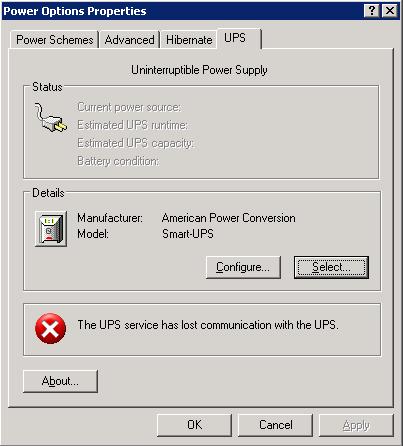
I have an APC Smart-UPS 1400XL connected to a server running Server 2003 through a serial cable. When I go to the Power Options under the UPS tab i have an error that states "The UPS service has lost communication with the UPS." I cannot figure out how to resolve this issue. I have tried two serial cables from APC (490-1524c and 490-0020b) with the same results. Any help will be greatly appreciated. Thank You.

-
I must say i agree with nmX.Memnoch. This is what i do with most of the servers i manage. Two drivers in raid 1 for the os and then the rest in raid 5 for storage. If anything happens you just need to swap the bad disk with a good one and the array will rebuild itself. Also on top of that i usually have a tape drive backup system so backups can be taken off site in case of fire/flood/etc.
-
Terminal Server Licensing Transfer
andrew_aj1 replied to andrew_aj1's topic in Windows 2000/2003/NT4
Yes we need terminal server; we have about a dozen thin clients we want to use and want to have some people be able to access their data while not in the office. I was actually able to find a document with the eopen information. When i go to the site and enter the information i do get the license information for windows server 2003, but not the terminal server licenses eventhough they are listed. Is there something im missing on the site? -
A company(company1) I do business for just aquired another company(company2). Part of the purchase of company2 included their computers and servers. Company1 wants to use these servers, but first we want to a fresh install of windows server 2003 before we switch over. The problem we have is that all the licensing is missing; either lost in paperwork somewhere or stolen by the previouse IT guy. I was able to extract the licenses for windows 2003, exchange, and office. The last thing we need is a way to get is the Terminal Server Licensing information. Is there any way to extract the license keys or transfer them to the new install of server 2003?