SheepyDaz
About SheepyDaz

- Birthday 09/30/1983
SheepyDaz's Achievements
0
Reputation
-
Hey Blue come across en error. log.txt Hope it helps. **EDIT** Seems I fixed the problem by putting the win7 directory in the root of my drive D:/win7/ **EDIT** Ok getting another error. Trying to integrate updates. log.txt
-
Blue, it seems the problem with the folder name is not fixed. I changed the folder where my source file are kept from 'win' to 'win7 pro' then i recieved this error. === 7Customizer Started=== 7Customizer Verion: 0.1.7 OS: Microsoft Windows NT 6.1.7600.0 OS Architecture: AMD64 Work folder found: True Mount folder found: True Extract utility found: True Configuration File found: True Getting drive info Getting drive info: Done Windows Source Path Selected Sources Folder Found install.wim Found Starting imagex Imagex created imagesinfo.xml Successfully Reading images information from imagesinfo.xml Unexpected Error: Data at the root level is invalid. Line 2, position 1. at System.Xml.XmlTextReaderImpl.Throw(Exception e) at System.Xml.XmlTextReaderImpl.ParseRootLevelWhitespace() at System.Xml.XmlTextReaderImpl.ParseDocumentContent() at System.Xml.XmlLoader.Load(XmlDocument doc, XmlReader reader, Boolean preserveWhitespace) at System.Xml.XmlDocument.Load(XmlReader reader) at System.Xml.XmlDocument.Load(String filename) at _7Customizer.Form1.selectImagePathBtn_Click(Object sender, EventArgs e) log.txt Renamed the source folder back to 'win'. An it works fine I'll upload a successful.log as well in a mo **EDIT** When I click 'Skip creating user' the username an password box highlights. It should be the other way around ;-) Suggestion - in the apply windows, any chance there can be a progress bar added or text box with a log of whats happening? **EDIT** Here is the sucess log - successlog.txt
-
Blue answered this before. It will need a lot of research before its added, but he has plans to add it;)
-
I didnt get this error at all Blue. When i used the "Skip creating user" Just before windows logged in for the first time, it asked to create a user. I done that an it logs in fine. Tested on 7 pro x86. Any chance you can get 7customizer to remember the imagex an dism locations? It becomes a pain adding the files each time. Also add so when you start the program it triggers off uac?
-
Looking forward to testing this new version out. Another suggestion - Perhaps add an option to create an iso once people have finished editing there images **EDIT** When using the unattended tab, i dont want to add a username as i will be using this image on multiple pc. Do i have to fill it in??
-
I think this is the same error as what i had. change the folder name where your extracted iso is to "win", then run 7customizer as admin.
-
So far so good. Very simple an easy for idiots like me. Successfully installed updates in win 7 pro x86. Will there be a feature for adding programs an applications? Few suggestions, hope you dont mind Auto Update feature In your help menu add a link which links to your forums/or support thread here. A link for the windows updates downloader perhaps. So peeps dont have to run around looking for win 7 updates.
-
Ok ran this with right click - Run as admin. Still errors out, i correctly used the imagex.exe an dism files. Heres the file you need. imagesinfo.xml **EDIT** After looking at the imagesinfo.xml it said - cannot find file c:\users\sheepy\desktop\win I renamed my folder which contained my windows image to just win an it worked. the folder was originally called win 7 pro. I dunno if that helps
-
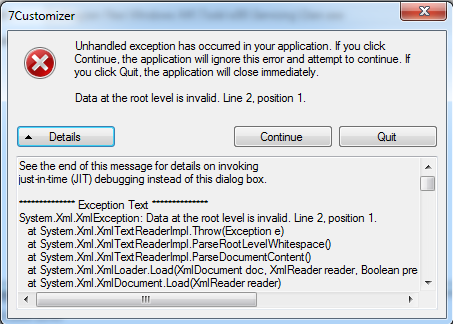
Hey there. Just downloaded this an tried to run it, recieved an error though. See the end of this message for details on invoking just-in-time (JIT) debugging instead of this dialog box. ************** Exception Text ************** System.Xml.XmlException: Data at the root level is invalid. Line 2, position 1. at System.Xml.XmlTextReaderImpl.Throw(Exception e) at System.Xml.XmlTextReaderImpl.ParseRootLevelWhitespace() at System.Xml.XmlTextReaderImpl.ParseDocumentContent() at System.Xml.XmlLoader.Load(XmlDocument doc, XmlReader reader, Boolean preserveWhitespace) at System.Xml.XmlDocument.Load(XmlReader reader) at System.Xml.XmlDocument.Load(String filename) at _7Customizer.Form1.selectImagePathBtn_Click(Object sender, EventArgs e) at System.Windows.Forms.Control.OnClick(EventArgs e) at System.Windows.Forms.Button.OnMouseUp(MouseEventArgs mevent) at System.Windows.Forms.Control.WmMouseUp(Message& m, MouseButtons button, Int32 clicks) at System.Windows.Forms.Control.WndProc(Message& m) at System.Windows.Forms.ButtonBase.WndProc(Message& m) at System.Windows.Forms.Button.WndProc(Message& m) at System.Windows.Forms.Control.ControlNativeWindow.WndProc(Message& m) at System.Windows.Forms.NativeWindow.Callback(IntPtr hWnd, Int32 msg, IntPtr wparam, IntPtr lparam) ************** Loaded Assemblies ************** mscorlib Assembly Version: 2.0.0.0 Win32 Version: 2.0.50727.4927 (NetFXspW7.050727-4900) CodeBase: file:///C:/Windows/Microsoft.NET/Framework64/v2.0.50727/mscorlib.dll ---------------------------------------- 7Customizer Assembly Version: 1.0.0.0 Win32 Version: 1.0.0.0 CodeBase: file:///C:/Users/Sheepy/Desktop/7Customizer/7Customizer.exe ---------------------------------------- System.Windows.Forms Assembly Version: 2.0.0.0 Win32 Version: 2.0.50727.4927 (NetFXspW7.050727-4900) CodeBase: file:///C:/Windows/assembly/GAC_MSIL/System.Windows.Forms/2.0.0.0__b77a5c561934e089/System.Windows.Forms.dll ---------------------------------------- System Assembly Version: 2.0.0.0 Win32 Version: 2.0.50727.4927 (NetFXspW7.050727-4900) CodeBase: file:///C:/Windows/assembly/GAC_MSIL/System/2.0.0.0__b77a5c561934e089/System.dll ---------------------------------------- System.Drawing Assembly Version: 2.0.0.0 Win32 Version: 2.0.50727.4927 (NetFXspW7.050727-4900) CodeBase: file:///C:/Windows/assembly/GAC_MSIL/System.Drawing/2.0.0.0__b03f5f7f11d50a3a/System.Drawing.dll ---------------------------------------- System.Xml Assembly Version: 2.0.0.0 Win32 Version: 2.0.50727.4927 (NetFXspW7.050727-4900) CodeBase: file:///C:/Windows/assembly/GAC_MSIL/System.Xml/2.0.0.0__b77a5c561934e089/System.Xml.dll ---------------------------------------- ************** JIT Debugging ************** To enable just-in-time (JIT) debugging, the .config file for this application or computer (machine.config) must have the jitDebugging value set in the system.windows.forms section. The application must also be compiled with debugging enabled. For example: <configuration> <system.windows.forms jitDebugging="true" /> </configuration> When JIT debugging is enabled, any unhandled exception will be sent to the JIT debugger registered on the computer rather than be handled by this dialog box. This happened after I selected the folder with my win 7 files. The os i was trying to customize is Win 7 Pro x86

-
Hey there. I have been looking for a way to implement some programs to my windows 7 image to make it a little easier when i install it on the family pc's. Whats the best program to use?? Thanks in advanced